
 Image 1 of 1
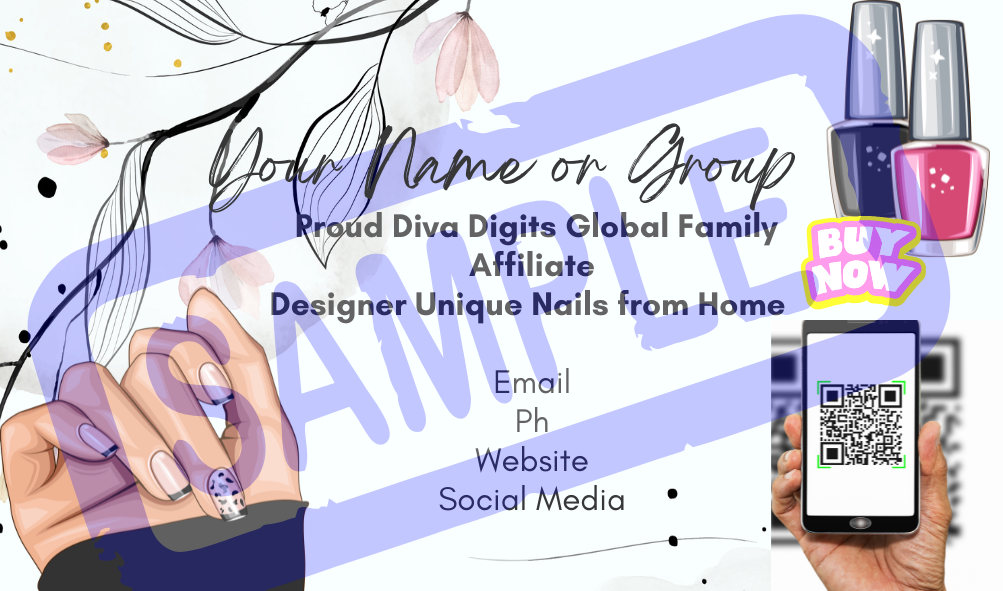
Diva Digits Family Business Card Template
Professional. Customizable. Designed to help you grow.
Create your own branded business cards in minutes using this fully editable Canva template, designed exclusively for Diva Digits affiliates.
Perfect for promoting your business at markets, adding to customer orders, or building your brand both online and offline.
✔ Fully editable business card template
✔ Instant access via Canva
✔ Customise with your own details
✔ Add your personal affiliate link & QR code
✔ Ready for print or digital use
Instant Digital Download – $3
(No physical item will be shipped)
Click the Canva link provided after purchase
Select “Use Template”
This creates your own editable version
Click into the text fields and update:
Your Name
Contact details (email/phone if using)
Social media (optional)
Your Diva Digits Affiliate Link
Keep it clean, clear, and professional.
Click Apps (left menu)
Search QR Code
Paste your affiliate link
Click Generate Code
Place and resize on your card
Go to Uploads
Upload your QR image
Drag onto the design
Resize and position neatly
Ensure QR code is clear and easy to scan
Keep spacing balanced
Avoid placing text too close to edges
Click Share → Download
Choose:
PDF Print (recommended for printing)
OR
PNG (for digital use)
✔ Test your QR code before printing
✔ Use high-quality cardstock for a luxe finish
✔ Keep your design aligned with Diva Digits branding
✔ Less is more — clean designs convert better
Customer order inserts
Vendor markets
Networking
Packaging
Social media promotions
This is a digital product only
No physical item will be sent
For use by Diva Digits affiliates
Do not resell or redistribute template
This is a simple but powerful tool to help you show up professionally and grow your Diva Digits business.
Consistency builds visibility. Visibility builds sales.
Get Your Diva On with Diva Digits
PNG Graphic provided on checkout and a Canva link will be sent to your notes in affilty for editing of business card allow up to 5 hrs for the link to be sent to your affilty account as this is not automated. Thanks kindly
Alternatively upload png picture into Canva and edit it manually
Diva Digits Family Business Card Template
Professional. Customizable. Designed to help you grow.
Create your own branded business cards in minutes using this fully editable Canva template, designed exclusively for Diva Digits affiliates.
Perfect for promoting your business at markets, adding to customer orders, or building your brand both online and offline.
✔ Fully editable business card template
✔ Instant access via Canva
✔ Customise with your own details
✔ Add your personal affiliate link & QR code
✔ Ready for print or digital use
Instant Digital Download – $3
(No physical item will be shipped)
Click the Canva link provided after purchase
Select “Use Template”
This creates your own editable version
Click into the text fields and update:
Your Name
Contact details (email/phone if using)
Social media (optional)
Your Diva Digits Affiliate Link
Keep it clean, clear, and professional.
Click Apps (left menu)
Search QR Code
Paste your affiliate link
Click Generate Code
Place and resize on your card
Go to Uploads
Upload your QR image
Drag onto the design
Resize and position neatly
Ensure QR code is clear and easy to scan
Keep spacing balanced
Avoid placing text too close to edges
Click Share → Download
Choose:
PDF Print (recommended for printing)
OR
PNG (for digital use)
✔ Test your QR code before printing
✔ Use high-quality cardstock for a luxe finish
✔ Keep your design aligned with Diva Digits branding
✔ Less is more — clean designs convert better
Customer order inserts
Vendor markets
Networking
Packaging
Social media promotions
This is a digital product only
No physical item will be sent
For use by Diva Digits affiliates
Do not resell or redistribute template
This is a simple but powerful tool to help you show up professionally and grow your Diva Digits business.
Consistency builds visibility. Visibility builds sales.
Get Your Diva On with Diva Digits
PNG Graphic provided on checkout and a Canva link will be sent to your notes in affilty for editing of business card allow up to 5 hrs for the link to be sent to your affilty account as this is not automated. Thanks kindly
Alternatively upload png picture into Canva and edit it manually